# iosevka
## Iosevka Font Builder
[Adam Kruszewski blog](https://adam.kruszewski.name/)
## Step by step guide in compiling a custom Iosevka font on Ubuntu/Debian
posted on 2019-10-27
My [last post](https://adam.kruszewski.name/2017/09/iosevka/) on how to build a custom Iosevka font got completely out of date as Iosevka changed the build system and moved away from Makefiles. I thought I’ll write an update with additional step-by-step guide on how to make it work on more popular GNU/Linux distribution - Ubuntu (it is pretty straightforward on Arch or Gentoo as every dependency can be installed by distro’s package/port manager).
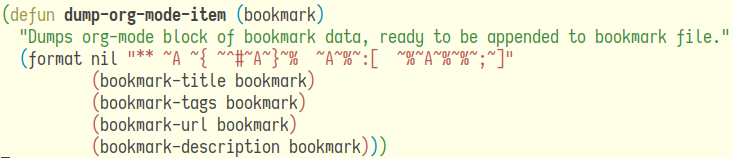
*Custom Iosevka font you can have today!*
***
~~Through the whole guide I assume we’ll clone most of the repositories used inside `~/Src/opensource/` directory.~~
> ***\* EDIT \****
>
> Just use the main workspace folder in gitpod.io. For example, in this case it is `/workspace/iosevka-font-builder`
### [Install dependencies](http://adam.kruszewski.name/#org9c38113)
There are three major dependencies for building Iosevka, NodeJS/NPM and ttfautohint are available as binaries in Ubuntu/Debian repositories so it is quite easy to install them running the following from terminal:
```bash
sudo apt install nodejs npm ttfautohint libttfautohint-dev
```
### [Build and compile premake5 for otfcc](http://adam.kruszewski.name/#orgefb1083)
Otfcc requires premake5 build system to build and we need to compile it from sources:
```bash
cd /workspace/iosevka-font-builder
git clone https://github.com/premake/premake-core
cd premake-core
make -f Bootstrap.mak linux
```
### [Build otfcc](http://adam.kruszewski.name/#org914d7c9)
We’ll not install premake system-wide, just execute it from otfcc’s source directory and build otfcc’s binaries.
```bash
cd /workspace/iosevka-font-builder
git clone https://github.com/caryll/otfcc
cd otfcc
../premake-core/bin/release/premake5 gmake
cd build/gmake
make config > release_x64
```
### [Clone Iosevka repository](http://adam.kruszewski.name/#orgadcd2bb)
Now we can finally clone Iosevka’s source repository.
```bash
cd /workspace/iosevka-font-builder
git clone https://github.com/be5invis/Iosevka -o iosevka
```
### [Install nodeJs dependencies](http://adam.kruszewski.name/#org02e47f0)
Node package manager will take care of last set of dependencies needed.
```bash
cd iosevka
npm install
```
***
### [Create a custom build plan for Iosevka font](http://adam.kruszewski.name/#org7e921df)
Now create a `private-build-plans.toml` file with the contents below inside Iosevka’s source directory. You can tweak look for each of the available options - please refer to [official Iosevka readme](https://github.com/be5invis/Iosevka) to see what options are available. The ones below are what I’m using and reflect what you could see on the picture at the beginning of this post.
#### `private-build-plans.toml`
```toml
[buildPlans.iosevka-custom]
family = "Iosevka Custom"
design = [
'extended',
'ligset-coq',
'v-l-tailed',
'v-i-serifed',
'v-j-serifed',
'v-a-singlestorey',
'v-f-tailed',
'v-g-opendoublestorey',
'v-m-shortleg',
'v-t-standard',
'v-q-taily',
'v-y-curly',
'v-zero-slashed',
'v-one-hooky',
'v-three-flattop',
'v-seven-normal',
'v-tilde-high',
'v-asterisk-hexhigh',
'v-paragraph-low',
'v-caret-high',
'v-underscore-low',
'v-percent-rings',
'v-at-short',
'v-brace-curly',
'v-dollar-throughcap',
'v-numbersigh-slanted'
]
```
#### My `private-build-plans.toml`
> I put this file in the `/workspace/iosevka-font-builder` directory as well as the `/workspace/iosevka-font-builder/iosevka` directory.
```toml
[buildPlans.iosevka-chad]
family = "Iosevka Chad"
...
```
click to expand whole file
```toml
[buildPlans.iosevka-chad]
family = "Iosevka Chad"
spacing = "normal"
serifs = "slab"
no-cv-ss = false
[buildPlans.iosevka-chad.variants.design]
capital-a = "curly-base-serifed"
capital-b = "standard-interrupted-bilateral-serifed"
capital-c = "bilateral-serifed"
capital-d = "standard-bilateral-serifed"
capital-e = "serifed"
capital-g = "toothed-serifed-capped"
capital-i = "serifed"
capital-j = "descending-serifed-both-sides"
capital-k = "symmetric-connected-serifed"
capital-m = "slanted-sides-flat-bottom"
capital-n = "standard"
capital-p = "closed"
capital-q = "crossing"
capital-r = "standing-open"
capital-s = "bilateral-serifed"
capital-w = "straight-flat-top"
capital-x = "curly-serifed"
capital-z = "cursive"
i = "serifed-asymmetric"
j = "serifed"
k = "curly-top-left-and-bottom-right-serifed"
l = "serifed-flat-tailed"
m = "short-leg-top-left-and-bottom-right-serifed"
n = "tailed"
q = "diagonal-tailed"
r = "top-serifed"
t = "diagonal-tailed"
w = "straight-flat-top-motion-serifed"
y = "straight"
z = "cursive"
zero = "long-dotted"
one = "base-flat-top-serif"
two = "curly-neck"
three = "flat-top"
four = "semi-open"
five = "vertical-upper-left-bar"
six = "straight-bar"
seven = "straight-crossbar-serifed"
eight = "crossing-asymmetric"
nine = "straight-bar"
tilde = "high"
asterisk = "flip-penta-high"
caret = "high"
paren = "flat-arc"
brace = "curly-flat-boundary"
number-sign = "slanted"
ampersand = "upper-open"
at = "fourfold-tall"
dollar = "through"
cent = "through"
percent = "rings-continuous-slash-also-connected"
lig-ltgteq = "slanted"
ascii-single-quote = "straight"
ascii-grave = "straight"
question = "corner"
punctuation-dot = "round"
[buildPlans.iosevka-chad.ligations]
inherits = "dlig"
```
***
### [(optional) Add legacy support for ligatures](http://adam.kruszewski.name/#org84aef7b)
For use with Emacs. If you use an editor with Open Ligatures support (basically all of them nowadays) or are just not interested in ligatures at all - skip this step. If you want legacy ligature support built in simply append lines below to `parameters.toml` in Iosevka’s source code directory (credits goes to [Soham Chowdhury](https://gist.github.com/mrkgnao/49c7480e1df42405a36b7ab09fe87f3d)).
#### `parameters.toml`
click to expand
```toml
# -----------------------------------------
# Double-ended hyphen arrows
# -----------------------------------------
[[iosevka.compLig]]
unicode = 57600 # 0xe100
featureTag = 'XV00'
sequence = "<->"
[[iosevka.compLig]]
unicode = 57601 # 0xe101
featureTag = 'XV00'
sequence = "<-->"
[[iosevka.compLig]]
unicode = 57602 # 0xe102
featureTag = 'XV00'
sequence = "<--->"
[[iosevka.compLig]]
unicode = 57603 # 0xe103
featureTag = 'XV00'
sequence = "<---->"
[[iosevka.compLig]]
unicode = 57604 # 0xe104
featureTag = 'XV00'
sequence = "<----->"
# -----------------------------------------
# Double-ended equals arrows
# -----------------------------------------
[[iosevka.compLig]]
unicode = 57605 # 0xe105
featureTag = 'XV00'
sequence = "<=>"
[[iosevka.compLig]]
unicode = 57606 # 0xe106
featureTag = 'XV00'
sequence = "<==>"
[[iosevka.compLig]]
unicode = 57607 # 0xe107
featureTag = 'XV00'
sequence = "<===>"
[[iosevka.compLig]]
unicode = 57608 # 0xe108
featureTag = 'XV00'
sequence = "<====>"
[[iosevka.compLig]]
unicode = 57609 # 0xe109
featureTag = 'XV00'
sequence = "<=====>"
# -----------------------------------------
# Double-ended asterisk operators
# -----------------------------------------
[[iosevka.compLig]]
unicode = 57610 # 0xe10a
featureTag = 'XV00'
sequence = "<**>"
[[iosevka.compLig]]
unicode = 57611 # 0xe10b
featureTag = 'XV00'
sequence = "<***>"
[[iosevka.compLig]]
unicode = 57612 # 0xe10c
featureTag = 'XV00'
sequence = "<****>"
[[iosevka.compLig]]
unicode = 57613 # 0xe10d
featureTag = 'XV00'
sequence = "<*****>"
# -----------------------------------------
# HTML comments
# -----------------------------------------
[[iosevka.compLig]]
unicode = 57614 # 0xe10e
featureTag = 'XV00'
sequence = ""
[[iosevka.compLig]]
unicode = 57683 # 0xe153
featureTag = 'XV00'
sequence = "-->-"
[[iosevka.compLig]]
unicode = 57684 # 0xe154
featureTag = 'XV00'
sequence = "-->--"
[[iosevka.compLig]]
unicode = 57685 # 0xe155
featureTag = 'XV00'
sequence = "-->>"
[[iosevka.compLig]]
unicode = 57686 # 0xe156
featureTag = 'XV00'
sequence = "-->>-"
[[iosevka.compLig]]
unicode = 57687 # 0xe157
featureTag = 'XV00'
sequence = "-->>--"
[[iosevka.compLig]]
unicode = 57688 # 0xe158
featureTag = 'XV00'
sequence = "-->>>"
[[iosevka.compLig]]
unicode = 57689 # 0xe159
featureTag = 'XV00'
sequence = "-->>>-"
[[iosevka.compLig]]
unicode = 57690 # 0xe15a
featureTag = 'XV00'
sequence = "-->>>--"
[[iosevka.compLig]]
unicode = 57691 # 0xe15b
featureTag = 'XV00'
sequence = ">-"
[[iosevka.compLig]]
unicode = 57692 # 0xe15c
featureTag = 'XV00'
sequence = ">--"
[[iosevka.compLig]]
unicode = 57693 # 0xe15d
featureTag = 'XV00'
sequence = ">>-"
[[iosevka.compLig]]
unicode = 57694 # 0xe15e
featureTag = 'XV00'
sequence = ">>--"
[[iosevka.compLig]]
unicode = 57695 # 0xe15f
featureTag = 'XV00'
sequence = ">>>-"
[[iosevka.compLig]]
unicode = 57696 # 0xe160
featureTag = 'XV00'
sequence = ">>>--"
[[iosevka.compLig]]
unicode = 57697 # 0xe161
featureTag = 'XV00'
sequence = "=>"
[[iosevka.compLig]]
unicode = 57698 # 0xe162
featureTag = 'XV00'
sequence = "=>="
[[iosevka.compLig]]
unicode = 57699 # 0xe163
featureTag = 'XV00'
sequence = "=>=="
[[iosevka.compLig]]
unicode = 57700 # 0xe164
featureTag = 'XV00'
sequence = "=>>"
[[iosevka.compLig]]
unicode = 57701 # 0xe165
featureTag = 'XV00'
sequence = "=>>="
[[iosevka.compLig]]
unicode = 57702 # 0xe166
featureTag = 'XV00'
sequence = "=>>=="
[[iosevka.compLig]]
unicode = 57703 # 0xe167
featureTag = 'XV00'
sequence = "=>>>"
[[iosevka.compLig]]
unicode = 57704 # 0xe168
featureTag = 'XV00'
sequence = "=>>>="
[[iosevka.compLig]]
unicode = 57705 # 0xe169
featureTag = 'XV00'
sequence = "=>>>=="
[[iosevka.compLig]]
unicode = 57706 # 0xe16a
featureTag = 'XV00'
sequence = "==>"
[[iosevka.compLig]]
unicode = 57707 # 0xe16b
featureTag = 'XV00'
sequence = "==>="
[[iosevka.compLig]]
unicode = 57708 # 0xe16c
featureTag = 'XV00'
sequence = "==>=="
[[iosevka.compLig]]
unicode = 57709 # 0xe16d
featureTag = 'XV00'
sequence = "==>>"
[[iosevka.compLig]]
unicode = 57710 # 0xe16e
featureTag = 'XV00'
sequence = "==>>="
[[iosevka.compLig]]
unicode = 57711 # 0xe16f
featureTag = 'XV00'
sequence = "==>>=="
[[iosevka.compLig]]
unicode = 57712 # 0xe170
featureTag = 'XV00'
sequence = "==>>>"
[[iosevka.compLig]]
unicode = 57713 # 0xe171
featureTag = 'XV00'
sequence = "==>>>="
[[iosevka.compLig]]
unicode = 57714 # 0xe172
featureTag = 'XV00'
sequence = "==>>>=="
[[iosevka.compLig]]
unicode = 57715 # 0xe173
featureTag = 'XV00'
sequence = ">="
[[iosevka.compLig]]
unicode = 57716 # 0xe174
featureTag = 'XV00'
sequence = ">=="
[[iosevka.compLig]]
unicode = 57717 # 0xe175
featureTag = 'XV00'
sequence = ">>="
[[iosevka.compLig]]
unicode = 57718 # 0xe176
featureTag = 'XV00'
sequence = ">>=="
[[iosevka.compLig]]
unicode = 57719 # 0xe177
featureTag = 'XV00'
sequence = ">>>="
[[iosevka.compLig]]
unicode = 57720 # 0xe178
featureTag = 'XV00'
sequence = ">>>=="
[[iosevka.compLig]]
unicode = 57721 # 0xe179
featureTag = 'XV00'
sequence = "<-"
[[iosevka.compLig]]
unicode = 57722 # 0xe17a
featureTag = 'XV00'
sequence = "-<-"
[[iosevka.compLig]]
unicode = 57723 # 0xe17b
featureTag = 'XV00'
sequence = "--<-"
[[iosevka.compLig]]
unicode = 57724 # 0xe17c
featureTag = 'XV00'
sequence = "<<-"
[[iosevka.compLig]]
unicode = 57725 # 0xe17d
featureTag = 'XV00'
sequence = "-<<-"
[[iosevka.compLig]]
unicode = 57726 # 0xe17e
featureTag = 'XV00'
sequence = "--<<-"
[[iosevka.compLig]]
unicode = 57727 # 0xe17f
featureTag = 'XV00'
sequence = "<<<-"
[[iosevka.compLig]]
unicode = 57728 # 0xe180
featureTag = 'XV00'
sequence = "-<<<-"
[[iosevka.compLig]]
unicode = 57729 # 0xe181
featureTag = 'XV00'
sequence = "--<<<-"
[[iosevka.compLig]]
unicode = 57730 # 0xe182
featureTag = 'XV00'
sequence = "<--"
[[iosevka.compLig]]
unicode = 57731 # 0xe183
featureTag = 'XV00'
sequence = "-<--"
[[iosevka.compLig]]
unicode = 57732 # 0xe184
featureTag = 'XV00'
sequence = "--<--"
[[iosevka.compLig]]
unicode = 57733 # 0xe185
featureTag = 'XV00'
sequence = "<<--"
[[iosevka.compLig]]
unicode = 57734 # 0xe186
featureTag = 'XV00'
sequence = "-<<--"
[[iosevka.compLig]]
unicode = 57735 # 0xe187
featureTag = 'XV00'
sequence = "--<<--"
[[iosevka.compLig]]
unicode = 57736 # 0xe188
featureTag = 'XV00'
sequence = "<<<--"
[[iosevka.compLig]]
unicode = 57737 # 0xe189
featureTag = 'XV00'
sequence = "-<<<--"
[[iosevka.compLig]]
unicode = 57738 # 0xe18a
featureTag = 'XV00'
sequence = "--<<<--"
[[iosevka.compLig]]
unicode = 57739 # 0xe18b
featureTag = 'XV00'
sequence = "-<"
[[iosevka.compLig]]
unicode = 57740 # 0xe18c
featureTag = 'XV00'
sequence = "--<"
[[iosevka.compLig]]
unicode = 57741 # 0xe18d
featureTag = 'XV00'
sequence = "-<<"
[[iosevka.compLig]]
unicode = 57742 # 0xe18e
featureTag = 'XV00'
sequence = "--<<"
[[iosevka.compLig]]
unicode = 57743 # 0xe18f
featureTag = 'XV00'
sequence = "-<<<"
[[iosevka.compLig]]
unicode = 57744 # 0xe190
featureTag = 'XV00'
sequence = "--<<<"
[[iosevka.compLig]]
unicode = 57745 # 0xe191
featureTag = 'XV00'
sequence = "<="
[[iosevka.compLig]]
unicode = 57746 # 0xe192
featureTag = 'XV00'
sequence = "=<="
[[iosevka.compLig]]
unicode = 57747 # 0xe193
featureTag = 'XV00'
sequence = "==<="
[[iosevka.compLig]]
unicode = 57748 # 0xe194
featureTag = 'XV00'
sequence = "<<="
[[iosevka.compLig]]
unicode = 57749 # 0xe195
featureTag = 'XV00'
sequence = "=<<="
[[iosevka.compLig]]
unicode = 57750 # 0xe196
featureTag = 'XV00'
sequence = "==<<="
[[iosevka.compLig]]
unicode = 57751 # 0xe197
featureTag = 'XV00'
sequence = "<<<="
[[iosevka.compLig]]
unicode = 57752 # 0xe198
featureTag = 'XV00'
sequence = "=<<<="
[[iosevka.compLig]]
unicode = 57753 # 0xe199
featureTag = 'XV00'
sequence = "==<<<="
[[iosevka.compLig]]
unicode = 57754 # 0xe19a
featureTag = 'XV00'
sequence = "<=="
[[iosevka.compLig]]
unicode = 57755 # 0xe19b
featureTag = 'XV00'
sequence = "=<=="
[[iosevka.compLig]]
unicode = 57756 # 0xe19c
featureTag = 'XV00'
sequence = "==<=="
[[iosevka.compLig]]
unicode = 57757 # 0xe19d
featureTag = 'XV00'
sequence = "<<=="
[[iosevka.compLig]]
unicode = 57758 # 0xe19e
featureTag = 'XV00'
sequence = "=<<=="
[[iosevka.compLig]]
unicode = 57759 # 0xe19f
featureTag = 'XV00'
sequence = "==<<=="
[[iosevka.compLig]]
unicode = 57760 # 0xe1a0
featureTag = 'XV00'
sequence = "<<<=="
[[iosevka.compLig]]
unicode = 57761 # 0xe1a1
featureTag = 'XV00'
sequence = "=<<<=="
[[iosevka.compLig]]
unicode = 57762 # 0xe1a2
featureTag = 'XV00'
sequence = "==<<<=="
[[iosevka.compLig]]
unicode = 57763 # 0xe1a3
featureTag = 'XV00'
sequence = "=<"
[[iosevka.compLig]]
unicode = 57764 # 0xe1a4
featureTag = 'XV00'
sequence = "==<"
[[iosevka.compLig]]
unicode = 57765 # 0xe1a5
featureTag = 'XV00'
sequence = "=<<"
[[iosevka.compLig]]
unicode = 57766 # 0xe1a6
featureTag = 'XV00'
sequence = "==<<"
[[iosevka.compLig]]
unicode = 57767 # 0xe1a7
featureTag = 'XV00'
sequence = "=<<<"
[[iosevka.compLig]]
unicode = 57768 # 0xe1a8
featureTag = 'XV00'
sequence = "==<<<"
# -----------------------------------------
# Monadic operators
# -----------------------------------------
[[iosevka.compLig]]
unicode = 57769 # 0xe1a9
featureTag = 'XV00'
sequence = ">=>"
[[iosevka.compLig]]
unicode = 57770 # 0xe1aa
featureTag = 'XV00'
sequence = ">->"
[[iosevka.compLig]]
unicode = 57771 # 0xe1ab
featureTag = 'XV00'
sequence = ">-->"
[[iosevka.compLig]]
unicode = 57772 # 0xe1ac
featureTag = 'XV00'
sequence = ">==>"
[[iosevka.compLig]]
unicode = 57773 # 0xe1ad
featureTag = 'XV00'
sequence = "<=<"
[[iosevka.compLig]]
unicode = 57774 # 0xe1ae
featureTag = 'XV00'
sequence = "<-<"
[[iosevka.compLig]]
unicode = 57775 # 0xe1af
featureTag = 'XV00'
sequence = "<--<"
[[iosevka.compLig]]
unicode = 57776 # 0xe1b0
featureTag = 'XV00'
sequence = "<==<"
# -----------------------------------------
# Composition operators
# -----------------------------------------
[[iosevka.compLig]]
unicode = 57777 # 0xe1b1
featureTag = 'XV00'
sequence = ">>"
[[iosevka.compLig]]
unicode = 57778 # 0xe1b2
featureTag = 'XV00'
sequence = ">>>"
[[iosevka.compLig]]
unicode = 57779 # 0xe1b3
featureTag = 'XV00'
sequence = "<<"
[[iosevka.compLig]]
unicode = 57780 # 0xe1b4
featureTag = 'XV00'
sequence = "<<<"
# -----------------------------------------
# Lens operators
# -----------------------------------------
[[iosevka.compLig]]
unicode = 57781 # 0xe1b5
featureTag = 'XV00'
sequence = ":+"
[[iosevka.compLig]]
unicode = 57782 # 0xe1b6
featureTag = 'XV00'
sequence = ":-"
[[iosevka.compLig]]
unicode = 57783 # 0xe1b7
featureTag = 'XV00'
sequence = ":="
[[iosevka.compLig]]
unicode = 57784 # 0xe1b8
featureTag = 'XV00'
sequence = "+:"
[[iosevka.compLig]]
unicode = 57785 # 0xe1b9
featureTag = 'XV00'
sequence = "-:"
[[iosevka.compLig]]
unicode = 57786 # 0xe1ba
featureTag = 'XV00'
sequence = "=:"
[[iosevka.compLig]]
unicode = 57787 # 0xe1bb
featureTag = 'XV00'
sequence = "=^"
[[iosevka.compLig]]
unicode = 57788 # 0xe1bc
featureTag = 'XV00'
sequence = "=+"
[[iosevka.compLig]]
unicode = 57789 # 0xe1bd
featureTag = 'XV00'
sequence = "=-"
[[iosevka.compLig]]
unicode = 57790 # 0xe1be
featureTag = 'XV00'
sequence = "=*"
[[iosevka.compLig]]
unicode = 57791 # 0xe1bf
featureTag = 'XV00'
sequence = "=/"
[[iosevka.compLig]]
unicode = 57792 # 0xe1c0
featureTag = 'XV00'
sequence = "=%"
[[iosevka.compLig]]
unicode = 57793 # 0xe1c1
featureTag = 'XV00'
sequence = "^="
[[iosevka.compLig]]
unicode = 57794 # 0xe1c2
featureTag = 'XV00'
sequence = "+="
[[iosevka.compLig]]
unicode = 57795 # 0xe1c3
featureTag = 'XV00'
sequence = "-="
[[iosevka.compLig]]
unicode = 57796 # 0xe1c4
featureTag = 'XV00'
sequence = "*="
[[iosevka.compLig]]
unicode = 57797 # 0xe1c5
featureTag = 'XV00'
sequence = "/="
[[iosevka.compLig]]
unicode = 57798 # 0xe1c6
featureTag = 'XV00'
sequence = "%="
# -----------------------------------------
# Logical
# -----------------------------------------
[[iosevka.compLig]]
unicode = 57799 # 0xe1c7
featureTag = 'XV00'
sequence = "/\\"
[[iosevka.compLig]]
unicode = 57800 # 0xe1c8
featureTag = 'XV00'
sequence = "\\/"
# -----------------------------------------
# Semigroup/monoid operators
# -----------------------------------------
[[iosevka.compLig]]
unicode = 57801 # 0xe1c9
featureTag = 'XV00'
sequence = "<>"
[[iosevka.compLig]]
unicode = 57802 # 0xe1ca
featureTag = 'XV00'
sequence = "<+"
[[iosevka.compLig]]
unicode = 57803 # 0xe1cb
featureTag = 'XV00'
sequence = "<+>"
[[iosevka.compLig]]
unicode = 57804 # 0xe1cc
featureTag = 'XV00'
sequence = "+>"
[[iosevka.compLig]]
unicode = 57805 # 0xe1cc
featureTag = 'XV00'
sequence = ">~>"
[[iosevka.compLig]]
unicode = 57806 # 0xe1cc
featureTag = 'XV00'
sequence = "<~>"
```
### [Build the iosevka font](http://adam.kruszewski.name/#org05845d4)
Finally we can build the font. Just for the build step run we’ll add otfcc’s binary path to the `$PATH` variable, for npm to find it. Go grab some coffee as it might take a while.
```bash
env PATH="$PATH:../otfcc/bin/release-x64/" npm run build -- contents::iosevka-custom
```
> I had to install `node lts/fermium` using `nvm` to get the font to build
> ALSO: I had to reduce the number of concurrent processes on gitpod. I added this to the command: `--jCmd=`
>
> ```bash
> env PATH="$PATH:../otfcc/bin/release-x64/" npm run build -- contents::iosevka-custom --jCmd=8
> ```
### [Install the font](http://adam.kruszewski.name/#org3c8f24c)
The last step is to install the font, a shortcut from using your desktop’s font manager is just to copy the fonts where font-config can find them and invalidate its cache.
```bash
cp build/iosevka-custom/*.ttf ~/.fonts
fc-cache -f
```
That’s all, custom Iosevka build should be available as “Iosevka Custom” now. Happy hacking!
About me:
I'm software architect and engineer with 20+ years of experience. Love coding and problem solving. CTO and co-founder of [RevDeBug](https://revdebug.com/).